Discover how to manage cloud cost effectively by identifying hidden drains that impact your budget.

November 25, 2026
Apple platform security relies on layers that depend on each other, so disabling one setting can quietly break protections elsewhere. A business may think it’s secure while a hidden gap leaves it open to attack.
Apple's security model only works end to end: hardware, encryption, and app review each cover a specific gap, and each assumes the others are doing their job. Switch off one setting and the rest don't automatically compensate—they just keep operating as if nothing changed.
That's the danger. A business can disable a single feature, see no immediate symptom, and keep trusting protections that are no longer actually in force. The failure isn't loud. It's a quiet mismatch between what the system looks like it's doing and what it's actually doing.
This isn't a technical footnote—it's a real threat to business operations and reputation, because the gap stays invisible until something exploits it.

Apple's security model stacks layers that lean on each other rather than standing independently. Hardware, encryption, and app review each add their own kind of protection, but each one's effectiveness depends on the layer beneath it being configured correctly.
Take the hardware inside an iPhone or Mac: it's built to support secure boot and encrypted storage, but only when the settings that activate those features are actually turned on. Switch one off, and the chip's protective design goes unused even though the hardware itself hasn't changed.
Encryption follows the same pattern. It protects data only when hardware and software are working in sync, so a skipped update or a misconfigured device can quietly weaken it with no visible warning sign. App review, meanwhile, screens apps for malware and privacy risks, but that screening assumes the operating system underneath is already secure.
So when one layer gets bypassed or misconfigured, the layers around it can't pick up the slack. The result is a business that believes it's protected while a gap sits hidden in plain sight.
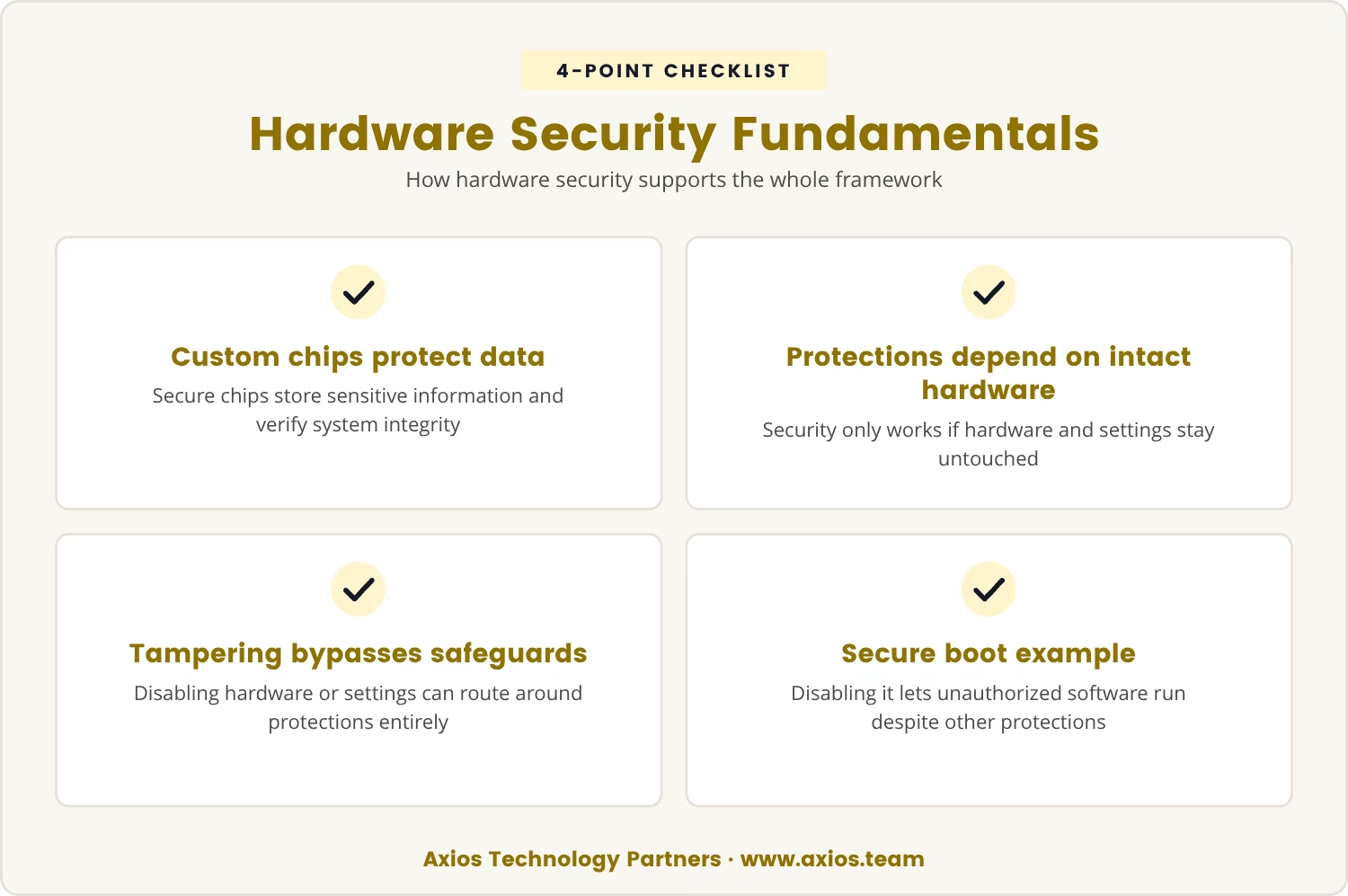
Hardware is where this entire system starts. Macs, iPhones, and iPads rely on custom chips to store sensitive information and verify that the operating system hasn't been tampered with.
Chips like the Secure Enclave handle the sensitive work—storing encryption keys, verifying Apple account credentials—and that work depends on the hardware staying untampered and its security settings staying enabled. Tamper with the hardware or disable a key setting, and those protections can be routed around entirely.
Disabling secure boot on a Mac, for instance, lets unauthorized software run even while other protections remain active elsewhere on the device. That's the clearest illustration that hardware security isn't a background feature quietly doing its job unnoticed—it's the piece the rest of the system is built on top of.
What is apple platform security, in practice? It's a framework that combines hardware, software, and app review so that device and data protection don't rest on any single safeguard—if one fails, others are designed to back it up.
But that backup only works if every layer stays intact, since each one depends on the others functioning correctly. Disable a key setting—automatic updates, device encryption—and the chain linking those layers can break quietly, without any alert that something changed.
That's why a small configuration change can carry an outsized impact. Businesses in Nashville and beyond need to recognize that the protections they can see are only as strong as the hidden settings holding them up.
Because the layers depend on each other, a single disabled feature rarely stays contained—it tends to ripple outward. Here's how that plays out in practice:
Each of these shows the same pattern: one change doesn't stay isolated, it touches multiple layers at once and leaves the whole system weaker than any single setting would suggest.
App security is where this dependency becomes concrete. Every app downloaded from the App Store passes through a review process built to catch malware and privacy issues before they reach a device.
That review, though, assumes the device's operating system and hardware are already secure—so if the underlying system is compromised, an approved app can still end up being the risk. A device with disabled system protections, for example, may let an attacker install something that looks legitimate while it quietly extracts data in the background.
So app review can't substitute for the layers beneath it. Hardware, software, and app review need to keep working together, because weaken one and the others can't fully cover for it.
Given how interconnected these layers are, protecting business data on Apple devices takes more than trusting the defaults. These practical checks help confirm every layer is actually doing what it's supposed to:
Put together, these steps close the exact gaps that appear when a single overlooked setting goes unnoticed.
Trust in an Apple device environment isn't something to set up once and walk away from—it has to be maintained actively, since settings can drift or get disabled without anyone noticing right away.
Regular reviews, ongoing user education, and clear documentation keep every layer of the framework active at the same time, which makes it considerably harder for an attacker to find and exploit a gap that's been sitting hidden.
If you haven't checked your device configurations recently, what would you find if you looked today? Taking the time to review can prevent costly surprises down the line.

Many businesses with 40 to 100 users trust Apple’s built-in protections, but it’s easy to miss a setting that quietly weakens the whole system. At Axios Technology Partners, we understand how one small change can put your data at risk.
We invite you to see how we approach layered security and talk with us about your current Apple device setup. Let’s make sure your protections are working together, not leaving silent gaps.
Get free ongoing security awareness training for your whole team—help everyone spot risks before they become problems.
Check device settings for encryption, secure boot, and automatic updates. On iPhones and iPads, look under Face ID & Passcode or Touch ID & Passcode in Settings; on Macs, check System Settings for FileVault and startup security options. Reviewing these regularly confirms the protections are actually active, not just available.
Disabling a hardware security feature like secure boot allows unauthorized software to run on the device. That weakens the overall security framework and opens the door to malware or data theft. Keeping these features enabled is what keeps the rest of the protection stack effective.
Skipping automatic updates means a device misses the security patches designed to close known vulnerabilities. Attackers specifically target those known gaps because they're reliable and well documented. Keeping updates enabled ensures devices carry the latest safeguards against emerging threats.
App review screens for malware and privacy risks, but it depends on the device's operating system and hardware already being secure. If system protections are disabled, even an app that passed review can become a risk. Full app security requires every layer—not just the review step—to stay active.
Review all device configurations immediately and restore any protections that were disabled. Investigate how the change happened in the first place and use that finding to reinforce user education around these settings. Remote management tools can also help monitor and control configurations across a business's entire device fleet.